6 minutes
Networking - The Absolute Basics
The world of networking is very complex. A lot is going on behind the scenes when you use the internet to send and receive data for web browsing, streaming, and playing video games online. Outside of home networks, when we start talking about business networks, enterprise networks, college campus networks, and data center networks, it gets significantly more complex.
Networking is complex
The average person out in the wild definitely does not appreciate the complexities of getting data from point A to point B around the world. Although they don’t really need to—they just want low ping to shoot people on Call of Duty or to be able to stream 4K UHD movies without any lag. To that, I say, fair enough.
But for us nerds, or more aptly named, technologists of the world, it is both amazing and fascinating how we are able to do all of this. Particularly for the older generation who experienced dial-up internet. I’m not even that old, and I can remember the crazy noises of a dial-up modem, and downloading songs at 30 Kbps for hours while my mom was going crazy for not being able to use the phone.
So, we are going to go through the very basics of what makes the data flow: the devices that connect together to form the networks all over the world, which collectively form what we know as the internet.
What builds a network
Beginning with LANs (Local Area Networks), which is what we generally call the network inside a single building or small area. This is where our end devices, such as computers and laptops, are connected, either through Wi-Fi or Ethernet cable, to access the internet.
Generally, we would say that a network needs four things to be considered a network (although this is not strictly the case; it could be shrunk to not include a switch or an ISP connection and still be considered a network, or you could have a switch and two hosts connected to it only without a router or ISP connection. It can also, and often does, go the other way and include many, many more devices and hosts). They are:
- A host system such as a PC
- A switch
- A router
- A connection to an ISP
PCs and other host devices such as laptops, smartphones, and smart TVs need no explanation here. I would also say a lot of people have heard the term ‘router’ before and know it as the device their home devices connect with to get internet access, usually through Wi-Fi but also through Ethernet cables. But most people probably don’t know how the router works. I would say most people wouldn’t have even heard of a switch and certainly don’t realize they have one in their home also, built into their home router.
The router
A router is our gateway into and out of our network. Without one, we could not have internet traffic pass into our network, nor could we pass traffic out into the global internet. Sure, we could connect all our devices onto the same home network and communicate between them without a router, but this isn’t all that useful on its own in the modern world. Those gamers who still have LAN parties are forgiven for screaming at me right now.
Many people would have heard of an IP address before; well, the router is like the phonebook for IP addresses. Now there are different kinds of IP addresses also: we have public addresses and we have private addresses. Private addresses are just that—private to our LAN and are what we assign to devices/hosts on our small network. They don’t go out to the internet, and we do not receive private addresses over the internet. A public IP address is what we use to send our traffic out onto the internet. Already that sounds confusing, having private IP addresses on our network and public addresses for the internet—how does that work? Well, it’s a complex topic. To distill it down simply, our host devices will have a private IP, which is used to communicate over our LAN, and our router will use a protocol to translate that into a public IP address for sending traffic out onto the internet. The router will also translate traffic coming from a public IP address on the internet into the correct private IP address it needs to go to inside our LAN.
So, our router is a gateway — a gateway into and out of our LAN. That is the basic function of a router. Now, they do a vast amount of more complex things than that, but that is the essence of what they do.
The switch
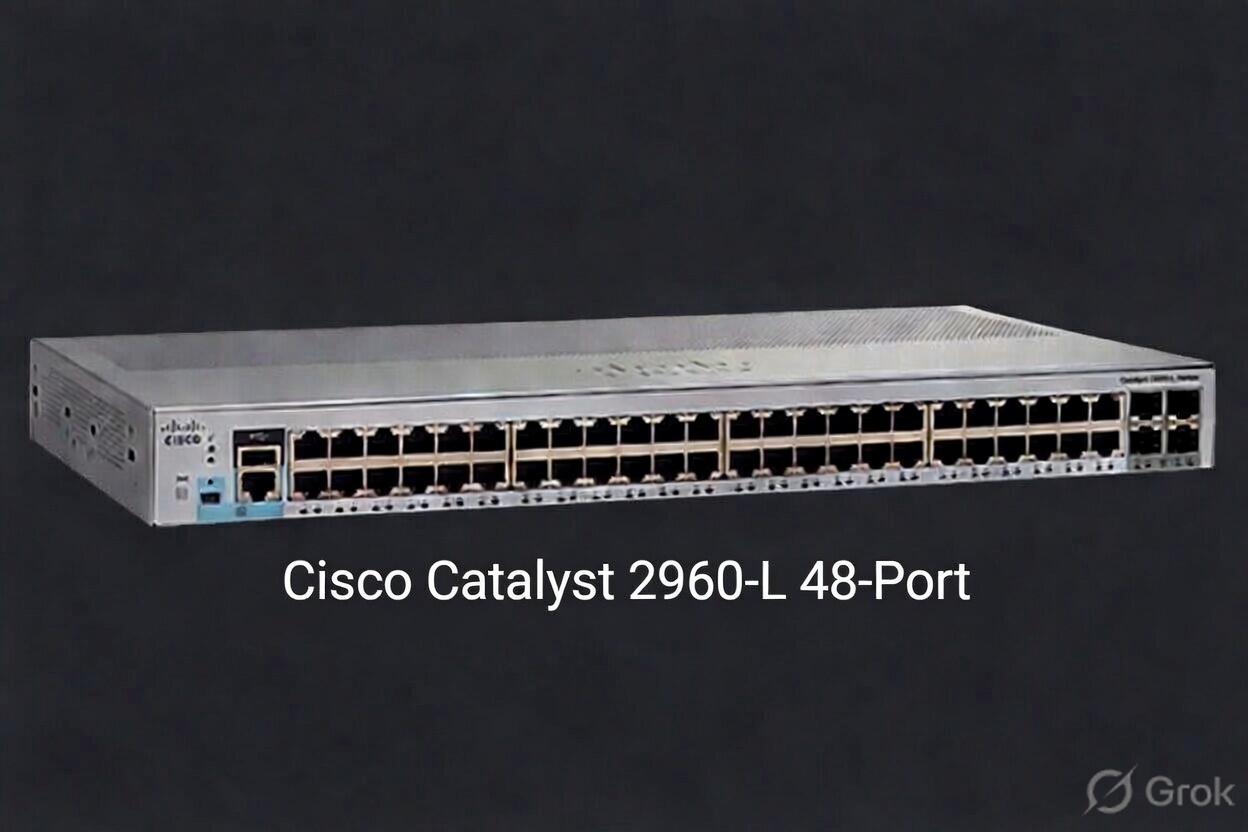
So, what is a switch?
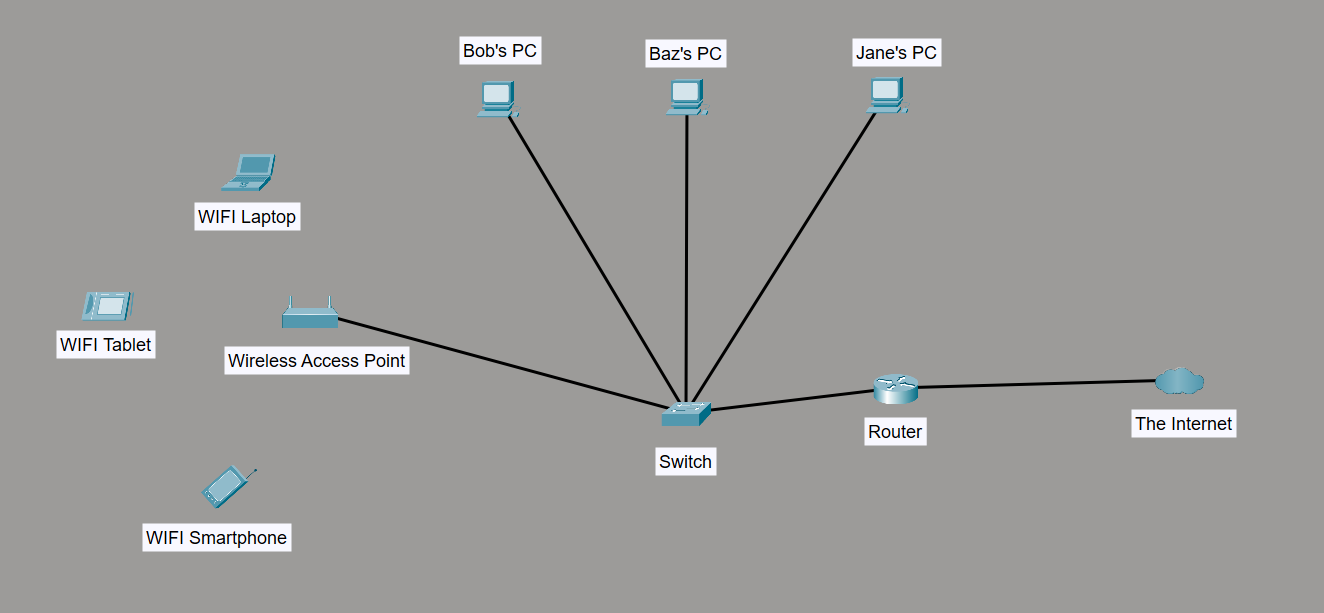
I thought you would never ask! In the simplest sense, a switch is what we need to make up a LAN. It is the backbone of the network. We connect all our host devices to a switch, and that is what makes up our LAN! Now, it is possible to make up a network without a switch, but it is not practical nor advisable for 99% of scenarios.
Rather than connecting our PCs together in a daisy chain of Ethernet cables, we connect them all to a switch; we connect our TVs to a switch, our smartphones, and our laptops. Wait, what? A switch is what gives us Wi-Fi? No, not directly. But it is what we connect a wireless access point to, and that is how we get Wi-Fi on our LAN.
For a typical home user, this must be very confusing because they are used to seeing their home router, which is essentially an all-in-one device. It is a router, a switch, and a wireless access point all built into one little box. This is fine for a home network and even for a small office network. But when the network grows, using an all-in-one device like this isn’t a good idea for a multitude of reasons.
For the average home user, the more advanced features of a switch, which are extraordinarily useful, are not of much concern. The more technically inclined among them, though, would find significant benefit from exploring the extra features a switch can provide; the main one, I would say, is VLANs, or virtual local area networks.
In summary
In summary, a switch is what we use to interconnect all our host devices on our local area network; a wireless access point is what converts that network into radio waves for wireless communication; and a router is what allows us to send and receive traffic from outside our local area network and connect to the internet.