3 minutes
VLANs at Home — Building a Segmented Network From Scratch
My home network had everything on one flat subnet for years. Laptops, phones, a desktop, a NAS, a couple of smart plugs of questionable origin — all of it talking to everything else with nothing in between. It worked, but it wasn’t a network so much as a free-for-all.
I finally sorted it out properly. Two VLANs — one for wired trusted devices, one for WiFi. Here’s the design and what the subnetting decisions looked like.
The topology

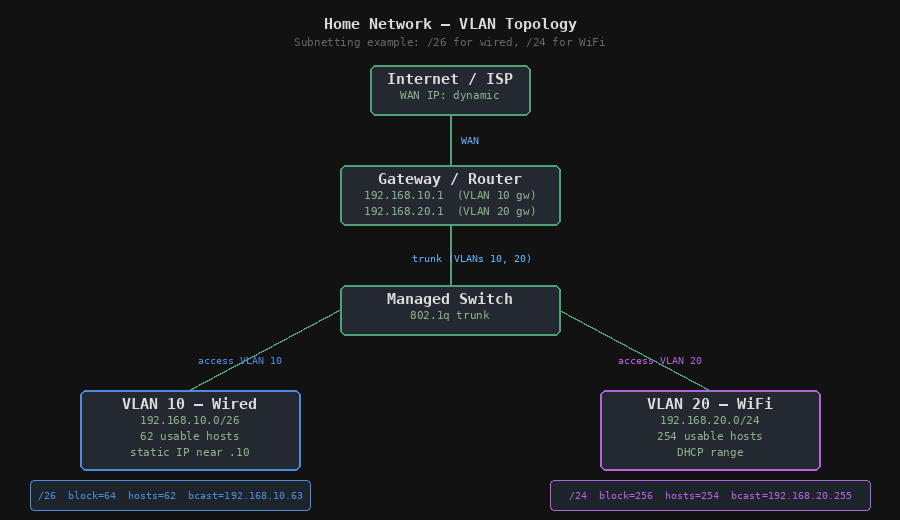
The diagram above shows the full picture. Gateway handles inter-VLAN routing. Managed switch carries the trunk down from the gateway and breaks it out to access ports. Two VLANs, two subnets, one physical network.
Subnetting decisions
This is where most people just default to /24 for everything and move on. I wanted to actually think about it.
VLAN 10 — Wired (192.168.10.0/26)
The wired network has maybe five or six devices on it. A /24 would give me 254 usable addresses for a network that will never have more than ten. That’s wasteful and also lazy. A /26 gives 62 usable addresses — still plenty of headroom, and it forced me to actually calculate it instead of reaching for the default.
Block size for /26 is 64:
| Address | Role |
|---|---|
| 192.168.10.0 | Network address |
| 192.168.10.1 | Gateway |
| 192.168.10.2 — .62 | Usable hosts |
| 192.168.10.63 | Broadcast |
The desktop gets a static address near the bottom of the range. Picked deliberately — easy to remember, easy to target in firewall rules.
VLAN 20 — WiFi (192.168.20.0/24)
WiFi is a different story. Phones, laptops, tablets, guests occasionally. A /24 is reasonable here — 254 usable addresses, proper headroom. No strong reason to subnet further.
Why separate VLANs at all
The practical reason: I don’t trust the WiFi devices as much as the wired ones. A laptop connecting over WiFi is probably fine, but it’s also the network my phone is on, and guest devices when people come round. Keeping wired and WiFi separated means a problem on the WiFi side can’t directly reach the wired network without going through the gateway first — which is where the firewall rules live.
The study reason: I’m working through CCNA. Setting this up on real hardware is worth more than reading about it. Every time I check a device’s IP or look at a firewall rule, I’m reinforcing something.
What’s next
The inter-VLAN rules are still too loose — currently I’ve allowed everything between the two VLANs just to get connectivity working. Tightening those up is the next job. Eventually I want a third VLAN for IoT stuff, but one thing at a time.